
課題申請システムNSL RINGによる、課題申請書の作成方法を解説します。
!重要!
★で示された箇所は、2024年度募集から新たに変更・追加された項目です。過去の年度から本システムで申請されてきた方も、よくご確認の上申請書を作成してください。
基本仕様
- NSL RINGでの入力フォームは、課題情報・装置/試料環境機器・持込機器・試料・関連課題・研究提案書の6ページからなります。
- 「課題情報」から「関連課題」のページまでの入力で課題申請書の前半部分が生成されます。
- 研究提案書(A4で2ページ以内)では、研究の背景・研究の目的と意義・実験の概要とビームタイムの根拠・期待される効果について記述し、PDF化してアップロードします。
- アップロードされた研究提案書が、そのまま課題申請書の後半部分になります。
- 総ページ数は、後述の「試料」と「持込機器」の数量に応じて変化します。
- 審査の際には、この課題申請書が査読者と装置責任者に直接送付されます。
入力欄について
- 「*」は必須項目です。入力しないと提出できません。
- [灰色]の欄は自動入力のため記入不要、または変更不可の項目です。
0.初めて申請する方・アカウントをお持ちでない方は
まずアカウントを作成します。すでにアカウントをお持ちの方は「1.申請の開始」へお進みください。
- NSL RINGにアクセス
- ページ下方の「ユーザ登録がお済でない方:ユーザー新規登録」をクリックします。
- 個人情報の保護方針を了承していただいた上で、希望するアカウントID・氏名等、必要事項を記入し【内容を確認する】をクリックします。
・希望するアカウントIDが既に使用されている場合は、別のIDにしてください。
・登録メールアドレスへの確認通知はありません。基本的に所属機関の正規のメールアドレスを登録してください。 - 内容を確認し、【この内容で登録する】をクリックし完了です。
備考
- 所属や身分等の変更があった場合、ログイン後に、【ユーザトップ】>【ユーザ情報の更新】から、登録内容を更新してください。新たにアカウントを作成しないでください。
- ID・パスワードを忘れてしまった場合は、【パスワードの再発行】から登録しているメールアドレスと生年月日を入力し、再発行手続きを行ってください。
- 登録しているメールアドレスも忘れてしまった場合、登録したかどうかすら忘れてしまった場合は下記の連絡先までお問い合わせください。
- アカウントは、原子力機構管理装置用の研究支援システムJRR-3 RINGと共通化されています。すでにJRR-3 RINGのアカウントをお持ちの場合は、そのアカウント名でログインしてください。
1.申請の開始
新規申請
すでに提出済みまたは編集中の課題がある場合で、さらに別の課題を申請する場合でも、この新規申請から行います。
- アカウント名、パスワードを入力し、ログインします。ユーザトップに移ります。
- 課題情報 に、現在申請が可能な課題が表示されるので、新規申請をクリックします。
・上部メニューの 【課題申請】>【一般課題申請】からも行けます。 - 課題申請書(新規登録)が表示されます。
・ここで、課題申請にあたっての注意事項が表示されますので、必ずご一読ください! 内容に同意していただける場合は、下方の
「□ 私は以上を同意したうえで、実験課題の申請を行います」
をクリックしてください。 - 同意後、課題申請書の編集画面に移ります。
作成中の申請書の編集を行う
「ユーザトップ」画面で、課題情報 の下方に表示されている「課題一覧はこちら」をクリックし、編集したい課題申請書を選択します。
2.課題申請書の入力の仕方
- 入力した情報は、[データ保存] を押す事で随時保存されます。
- 入力した情報の編集や研究提案書の更新は、提出前であれば締切日まで随時可能です。全て入力しなくても先に進むことができます。前のページに戻って入力したり、後日ログインし直して編集することも可能です。
- [PDF] を押すと、現在入力されている情報での課題申請書を閲覧できます。
| 申請番号 | 入力不要。「NSL-00000xxx」の形式で申請書作成順に自動付与されます。 |
| 課題番号 | 入力不要。採択時に付与されます。 |
| *課題名 *課題名(英) | 和文と英文で簡潔に記入してください。課題一覧に掲載されます。 上付き下付きは入力できませんので、”La2CuO4″のようにそのまま記入してください。 |
| 継続課題 | 該当する場合は、前年度の課題番号をプルダウンから選択します。プルダウンにない場合は、右側の欄に直接手入力してください。過去の採択課題はこちらで確認できます。 |
| *研究分野 | 適切な分野を選択してください。これに基づいて査読者が決定されます。 |
研究代表者(申請者)
ログインしているユーザ情報がそのまま自動入力されます。所属等変更がある場合は、上部メニューの [Top] > [ユーザ情報の更新] から更新してください。
※研究代表者の有資格者は、日本国内の国公私立大学・国公立研究所・独立行政法人等に所属する教員、研究員、博士研究員またはそれに相当する役職の研究者ならびに大学院生(博士後期課程、博士課程進学予定の修士課程を含む)です。海外機関の場合もこれに相当している必要があります。企業所属の研究者の課題申請はできません。
※ 混乱を招くため、2024年度申請から「申請者」と「研究代表者」を統合しました。
申請者が大学院生の場合
- 2023年度申請から導入した学生課題の運用に合わせて、本システムを改良しました。指導教員確認書に記入した、指導教員の氏名、メールアドレス等について入力してください。
指導教員が研究協力者に入らない場合は、この実験を実施する際に代理で指導教員的役割を担う助教等について入力してください。 - また、学生課題申請の場合は、以下から「指導教員確認書」をダウンロードし、必要事項を記入のうえ、指導教員から課題申請事務宛にメール提出してください。
★実験付添者(大学院生のみ)
大学院生の方が研究代表者(PI)となり申請する場合には、実験付添者を1名選任してください。実験付添者は必ず実験に参加し、装置責任者または装置担当者の同意を得た方を選任することを推奨しますが、日本語のみの対応でも可能で、かつ使用装置およびGUP手順を十分に理解している研究協力者でも選任可能です。
なお、実験付添者は研究代表者(PI)だけでなく、日本国外から来るすべての協力者との連絡窓口も担当します。
研究協力者
- 6名まで登録できます。企業の研究者も登録可能です。
★ 学生課題の場合、上記の実験付添者は自動的に研究協力者の1人となるため、ここで再入力する必要はありません。 - 研究協力者が既にアカウントを所持している場合は、その者の登録メールアドレスを記入して [検索] を押すと、[—-] が [paste] に替わります。これを押すと、姓名以降の情報が自動入力されます。
- アカウントを所持していない場合や登録メールアドレスが不明の場合は、直接手入力してください。
- この際に、この研究協力者のアカウントが自動的に生成されることはありません。
- 研究協力者には、登録されたことや課題申請を行なった事は通知されません。登録の際は当事者間で課題申請する旨を事前に確認するようにしてください。
実験ができない日時等
- 申請する年度のビームタイムのうち、確実に来所・実験が不可能な日程、特に希望する日程がある場合は記述してください。
- 不可能な日程は最小限にしてください。あまりに多い場合は、マシンタイムの調整が困難となるため、採択されなくなる場合があります。
備考・その他
- 審査員、装置責任者等への連絡事項、審査に関する要望などがあれば記述してください。
《使用希望装置》
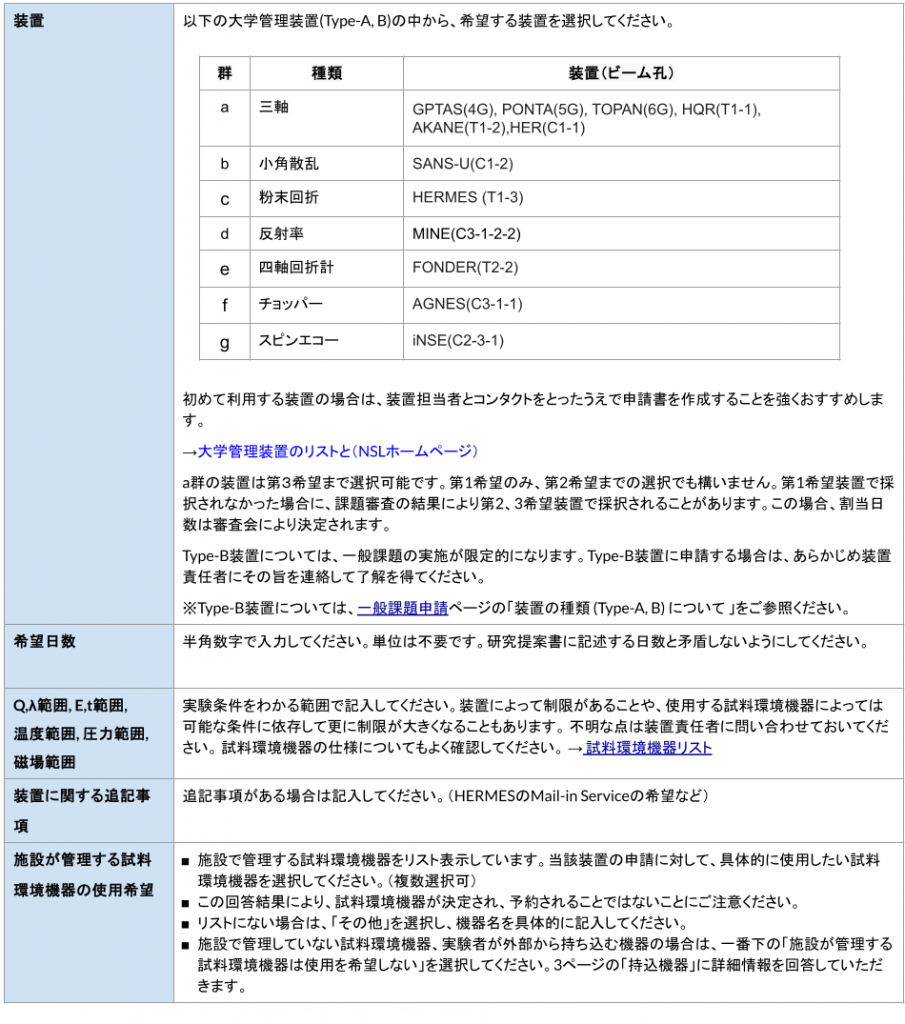
※研究代表者の有資格者は、日本国内の国公私立大学・国公立研究所・独立行政法人等に所属する教員、研究員、博士研究員またはそれに相当する役職の研究者ならびに大学院生(博士後期課程、博士課程進学予定の修士課程を含む)です。海外機関の場合もこれに相当している必要があります。企業所属の研究者の課題申請はできません。
※ 混乱を招くため、2024年度申請から「申請者」と「研究代表者」を統合しました。
JRR-3では、ユーザーが実験室内に持ち込む試料や機器について、持ち込み前に安全審査を行うとともに、機器の名称、使用/保管場所、保管期間などが提出される必要があります。正確に回答・記入してください。
- 実験者が自作または自前で用意する機器など、JRR-3実験室外(J-PARCも含みます)から機器を持ち込む場合は、その仕様や安全対策、使用時の注意点について回答していただきます。
- PC類を除く、定格入力容量100W以上の電源を使用する機器については、必ず回答してください。
- 提出された内容は、安全審査の際の基礎情報になるとともに、JRR-3の施設管理者(研究を専門としない原子力機構の職員)が内容を確認する場合があります。非専門家が読んでもわかるように、分かり易くかつ正確に記入してください。
- 過去にJRR-3で使用実績がないような特殊な機器、運転の際には特に注意を要する機器の場合は原子力機構側での安全審査において審議が必要になる場合があります。申請前に、装置責任者または大学安全管理統括チームにご相談ください。
持込機器の有無
「あり」を選択すると、1台目の持ち込み機器の回答・記入欄が表示されます。
【持込機器 Bringing-in device】
| *機器名称* | 客観的にわかる名称を記入してください。 |
| *製造方法 | 該当するものを選択してください。 |
| *機器の仕様 | 製作年月、到達可能な温度範囲、最高磁場、最高圧力など、機器の性能について記述してください。 メーカー購入品については、商品名・型番、物品が掲載されているURLなどを記入してください。 |
| *電源 | 単相か三相か、周波数(Hz)、最大電圧(V)、定格入力容量(W)を記入してください。 |
| *冷却水の使用 *圧縮空気の使用 | 使用する場合(使用する可能性がある場合も含む)は、「あり」を選択してください。 |
| *使用場所 | 主に使用する場所を選択してください。 実験準備用などで装置近辺で使用しない場合は、「炉室その他」または「ガイドホールその他」を選択してください。 |
| *使用目的等 | 使用目的、使用方法、使用の際に発生しうる危険の可能性、そのための安全対策についてわかりやすく記述してください。 |
| 参考資料 | 購入・製作時の仕様書、自作機器の場合の設計図などがあれば、pdf化してここからファイルをアップロードしてください。 合計20MBまで可能です。 |
2台以上の持ち込み機器がある場合
【+持込機器n追加】を押してください。2台目以降の持ち込み機器に対する回答・記入欄が表示されます。最大10台まで申請可能です。
試料の安全情報
上述のSDSYSに入力するための情報となりますので、正確に回答・記入してください。10個まで申請可能です。
【試料情報】
| *化学式・組成 | 通称や略称は用いず、具体的に記入してください。混晶系やドープ系化合物の場合なども、組成を正確に書いてください。 上付き・下付きは入力できませんので、そのまま記入してください。 |
| *試料名(和名) | 試料の日本語名を記入してください。例)グリセリン 金属間化合物・酸化物などで正確な表現が難しい/存在しない場合は、成分元素がわかるように記入してください。 例)イットリウムーバリウムーコバルト酸化物 |
| *試料形態 | 該当するものを選択してください。該当するものがない場合は、「その他」を選択し、右側の欄に記入してください。 |
| *質量 *容量 | おおよその量を単位とともに記入してください。 マシンタイム配分の際の判断材料になるとともに、大量の場合は、事前に安全審査が必要な場合があります。 |
モザイク 空間群 格子定数 | FONDER(T2-2)を希望する場合は必ず回答してください。 ★FONDER以外の装置では、回答不要のため非表示としました。 |
試料の安全情報
試料の化学安全・放射線安全に関して、Yes か No かを回答してください。回答結果をもとに、施設側でリスクアセスメント(RA)を行い、結果を申請者に通知します。RAの段階で施設から質問が行く場合もあります。通常状態(常温・常圧・無磁場)でNoであっても、実施予定の実験条件での物性の変化によりYesとなりうる場合は、Yesとしてください。
| *毒物・劇物 | 該当する場合は「Yes」を選択してください。こちらをご参照ください。 |
| *可燃性 | 熱源により容易に発火する恐れがある場合は「Yes」を選択してください。 |
| *容器との反応性 | 実験予定の条件により、容器(試料セル)と反応するおそれがある場合は「Yes」を選択してください。 |
| *爆発性 | 熱源により急激に膨張したり、容器が無い場合は飛散したりする恐れがある場合は「Yes」を選択してください。 |
| *腐食性 | 空気や水分の影響により、試料自身や容器が化学変化するおそれがある場合は「Yes」を選択してください。 |
| *核燃物質 | U, Ph, Thを含む物質が核燃料物質と定義されています。該当する場合は「Yes」を選択してください。 核熱物質を用いた実験が可能な装置は、GPTAS, PONTA, TOPAN, HQRの4台です。 |
| *放射性 | 放射性同位体を含む物質の場合は「Yes」を選択してください。 |
| *放射化性 | 実験終了後、線量が下がるまで1か月以上要する場合は「Yes」を選択してください。 |
試料の安全情報
容器の種類と容器への封入方法、固体であれば容器に対する固定方法、粉末・液体・気体の場合は容器から漏れ出さないための対策方法についてわかりやすく記述してください。試料の状態(結晶性など)を確認後に容器に封入する場合、測定の直前に合成などの処理が必要な場合、その他注意を要する事項があればその旨を記述してください。
既に登録済の試料を再度申請する場合
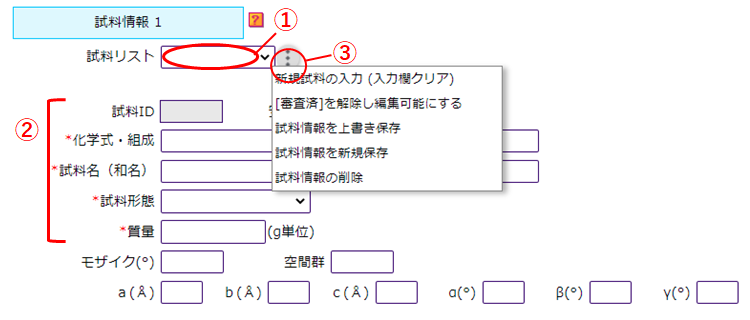
今年度以前の課題で申請済の試料を今回の課題申請で再度使用したい場合、申請済の試料の情報を元に新規で申請したい場合は、以下の手順で登録してください。
① 試料リストの右枠内をクリックすると、申請者が以前に申請した試料がプルダウン表示されます。該当するものを選択してください。
② 試料ID、化学式・組成以降の情報が読み込まれていることを確認してください。
③ 再度使用したい場合は、そのまま、「試料情報を上書き保存」を選択します。新規で申請し直す場合は、②の変更箇所があれば修正したうえで、「試料情報を新規保存」を選択します。
過去3年間の関連課題について
過去3年間で関連する採択課題がある場合は、3件まで記入してください。
| 課題番号 課題名 | 関連課題の課題番号・課題名を入力してください。過去の採択課題についてはこちらから確認できます。 |
| 成果発表 | 学会・論文・プレス発表をした場合は、その内容を記述してください。 |
| 到達度 | 当初の計画に対して、どの程度の進捗・成果が得られたかを記述してください。 装置の不具合や試料が準備できなかったなどの理由で、実験が実施できず成果報告を提出できなかった場合はその理由を記述してください。 |
| 関連性 | 本申請とつながる成果があった場合は、その旨を記述してください。 |
研究代表者が発表した最近の研究論文
研究代表者および協力者が最近発表した発表論文の著書、タイトル、雑誌名、巻数、発表年、ページ番号を5編まで記述してください。
・研究提案書は、各自でPDFファイルに変換してからアップロードしてください。
・アップロードできるPDFファイルは1つのみです。アップロード後に修正する場合は、修正したPDFファイルを再度アップロードしてください。
・[研究提案書またはダウンロード]より、現在アップロードされている研究提案書が確認できます。
*実験の要旨
研究提案書の内容を400字以内で要約してください。
*研究提案書ファイルをアップロード
・研究提案書の作成方法はこちらをご参照ください。
・テンプレートは以下からダウンロードできます。
・研究提案書は、各自でPDFファイルに変換してからアップロードしてください。
・アップロードできるPDFファイルは1つのみです。アップロード後に修正する場合は、修正したPDFファイルを再度アップロードしてください。
・[研究提案書またはダウンロード]より、現在アップロードされている研究提案書が確認できます。
3.申請書の提出
提出前に申請内容に問題がないか、よく確認してください。【PDF】ボタンから提出される形式で申請書を閲覧できます。
- 【入力チェック・提出】を押します。
- 入力内容に不備がある場合は、メッセージに従って修正してください。
- 不備がなければ、最終確認画面が出ます。【課題申請を提出する】を押して提出完了です。
- 提出後は、申請書の内容の編集・更新ができませんのでご注意ください。
編集中の申請書は、締切を過ぎても提出したことにならず査読もされませんのでご注意ください。
申請締切後は・・・・
- 申請書の提出が一切できなくなります
- ログインすることで、これまで提出したすべての申請書が閲覧できます
申請に関するお問い合わせ
Address
〒319-1106
茨城県那珂郡東海村白方106-1
東京大学物性研究所附属中性子科学研究施設 事務室
TEL
FAX
We will explain how to create a proposal of the general user program (GUP) using the GUP support system, NSL RING.
!IMPORTANT!
Items marked with ★ are new changes or additions effective for the 2024 application cycle. Even if you have submitted applications through this system in pervious years, please review these changes carefully before preparing your application.
Basic Specification
- The application form of NSL RING consists of six pages: main information, instrument sample environment, bringing-in device, sample, related proposal, and research plan.
- The first half of the proposal application form will be created by entering information from “main information” to “related proposal” pages.
- In the research plan (within 2 pages of A4-size), background of the research, purpose and significance of the research, outline of the experiment and basis for the beamtime, and expected results are to be described and uploaded as a PDF format.
- The uploaded research plan will be the second half of the proposal application form.
- The total number of pages will vary depending on the quantity of “sample” and “bringing-in device” as mentioned later.
- The proposal application form created here will be sent directly to the IRT leaders and referees.
Entry field
- “* ” marked part is a required item. If you do not fill in, the form cannot be submitted.
- [gray] written in gray is an item that you do not need to fill in or cannot change as the user information is automatically entered as it is.
0.If you apply for the first time or do not have an account
First, create an account. If you already have an account, please proceed to “1. When you start application”.
- Access NSL RING.
- Click “If you do not have your account yet: Sign up” at the bottom of the page.
- After agreeing to personal information protection policy, fill in the required information such as desired account ID and name, and click [Check the contents].
・If your desired ID is already taken, please use a different account ID.
・There will be no confirmation notice to the registered email address. Basically, please register a valid email address of your affiliated institution. - Check the contents and click [Register with this content] to complete.
Remarks
- If there is a change in your affiliation or position, there is no need to create a new account. Log in and update your personal information at the Menu [Top]>[Modification] .
- If you forget your account or password, please input your registered email address and date of birth at [Resetting your password] to reissue them .
- If you also forget your registered email address, if you forget whether you have registered or not, or if you have created multiple accounts by mistake, please make an inquiry below.
e-mail : nsl-appl [at] issp.u-tokyo.ac.jp - The accounts are shared with the proposal application system for the instruments owned by JAEA, JRR-3 RING. If you already have a JRR-3 RING account, please log in with it.
1.When you start application
Proposal Submission Form (New)
Even if you have already submitted or are editing a proposal application form and would like to apply for another proposal, create your application form from [New].
- Input your account and password to log in. Select [Top] >[Top] .
- Proposals that are currently available for application are displayed at [Proposal List], so click [New].
・You can reach the same page from [Application]>[Proposal] at top of the page. - [Proposal submission form (New)] is shown.
・Notes on applying for proposals are shown here, so be sure to read through it. If you agree with the content, please click below.
「□ I hereby agree to the above before editing new proposal.」 - After agreeing, you will be redirected to the editing screen for proposal application form.
When editing your draft application
To resume editing the proposal, at [Top] page, click [Go to Proposal list].
2.How to Fill in Proposal Application Form
- Editing data will be saved as needed by clicking [Save Data] .
- You can edit the information you entered or update your application document as needed until the deadline before submission. You can proceed without filling in all items. You can return to the previous page to enter information, or log out and log back in to edit at a later date.
- If you click [PDF] , you can view the proposal application form with the information currently entered.
| Application ID | No need to enter. It is automatically numbered as the format “NSL-000xxxx” when creating a new proposal. |
| Proposal ID | No need to enter. It will be given if this proposal will be judged as ACCEPTED or RESERVED. |
| *Title | Please fill in briefly. It will be published on NSL-homepage. Superscript and subscript cannot be entered, so please fill in as “La2CuO4”. |
| Past proposal related | If you have the past accepted proposal(s) relating to this editing proposal, select the past proposal or fill in the proposal ID as 23XXX. For adopted proposals of the past, please refer here. |
| *Research field | Select the most suitable research field. |
Principal Investigator (PI; About YOU)
Your personal information is automatically filled in. If your change it, access to [Top]> [Modification].
If the applicant is a graduate student (only doctoral course equivalent)
- Download the Academic Supervisor Approval and fill in the necessary information first. Then, please send an email from your academic advisor to the users office.
- Input your academic advisor in ”Research Collaborator 1″ below.
e-mail : nsl-appl [at] issp.u-tokyo.ac.jp
★Japanese Contact Person
At the experiment in JRR-3, more than one Japanese research collaborator must be included. (Here, “Japanese” includes foreigners who live in Japan and understand Japanese language.)
Choose the Japanese contact person among the Japanese collaborator(s). The contact person must always attend the experiment. We recommend you to choose the instrument leader or manager as the contact person after getting his/her agreement. Of course, the collaborator, who can speak Japanese and understand well the instrument to be used and the GUP procedures, is also possible.
All the notices with respect to the procedures before visiting are emailed to both you and the contact person.
Note that the contact person must serve not only for PI but also for all collaborator(s) coming from outside of Japan.
Research Collaborator
- Up to 6 collaborators can be registered.
★ The above contact person is not required to register again here because he/she is already included as one of the research collaborators. - The registered collaborator will neither be notified that he/she has been registered, nor that the proposal has been submitted. Be sure to confirm with the collaborators in advance that you plan to apply the proposal.
Inconvenient season or dates
- For the next beamtime year (between next Apr. and the year after next Mar.), indicate the unavailable days to perform the experiment, or your especially-desired days.
Remarks
- Message or requests for the instrument managers and the referees.
《Instruments》

If you plan to bring in the device(s) provided by yourself or your collaborator from OUTSIDE OF JRR-3 (including J-PARC), answer its name, specifications, cautions on use and safety measures.
- Be sure to submit the device with more than 100W of the rated input capacity, except laptop PC.
- All submitted items should be answered clearly and precisely, because the descriptions may be checked by the administrators of JRR-3 (JAEA staff who is often non-expert for your research field).
- Special device, for example device which nobody has used at JRR-3 in the past or which is required special attention when driving it, may be subject to the safety review by the safety committee in JAEA. Before submitting the proposal, contact the instrument leader or University-owned instruments Safety-management Team prior to submitting the proposal.
Bringing-in device
If you select “yes”, the write-in column of the first device will be shown.
【Bringing-in device】
| *Name of device | Enter the name of device. |
| *Manufacture | Select the applicable one. |
| *Specifications | Enter the performance of the device such as the manufactured or purchased date, temperature range, maximum magnetic field and maximum pressure. For manufacturer, fill in the product name, model number, and URL where the product is shown. |
| *Power source | Enter the eletcric specifications: single- or three-phase, frequency(Hz), maximum voltage(V), rated input capacity(W). |
| *Does this device require circulating cooling water installed in JRR-3 *Does this device require compressed air in | Select “Yes” if there are any possibility to use them. |
| *Where do you use this device in JRR-3? | Select the location where the device will be used. Select either “Other of reactor hall” or “Other of guide hall” if it will not be used around the instrument but used for the preparation only. |
| *Purpose, and precautions of use | Be sure to fill in the purpose and method of use. Also, if there are risks related with use, describe the possible risks and the safety measures to reduce those risks. Note that the facility may contact you if the description is insufficient. |
| Attachment file(s) | Upload specification document attached when purchasing, blueprint of your constructed device(s), and so on in pdf format within 20MB in total. |
If you have two or more bringing-in devices
Click【+Bringing-in device n Add】. Another set of the textboxes is displayed. Up to 10 devices can be applied.
This information is required to enter it in SDSYS, so please answer an fill in it accurately. You can apply for up to 10 items.
【Sample】
| *Chemical Formula or Composition | Fill in a chemical formula (neither common nor abbreviated name). Describe the composition precisely for substitution material, doped compound and so on. Superscript and subscript cannot be entered, so please fill in without them. |
| *Name of sample | 試料の日本語名を記入してください。例)グリセリン 金属間化合物・酸化物などで正確な表現が難しい/存在しない場合は、成分元素がわかるように記入してください。 例)イットリウムーバリウムーコバルト酸化物 |
| *State | 該当するものを選択してください。該当するものがない場合は、「その他」を選択し、右側の欄に記入してください。 |
| *Mass | おおよその量を単位とともに記入してください。 マシンタイム配分の際の判断材料になるとともに、大量の場合は、事前に安全審査が必要な場合があります。 |
Mosaicity (degree) Space Group Lattice Lattice Const. | FONDER(T2-2)を希望する場合は必ず回答してください。 Fill in here for FONDER (T2-2) you desire. ★FONDER以外の装置では、回答不要のため非表示としました。 For instruments other than FONDER, no response is required, so this section has been hidden. |
Safety Information
Provide answers regarding chemical safety and radiation safety below. Based on this information, the facility will conduct Risk Assessments and let you know the results.
Even if it has no risk under normal conditions, such as room temperature, ambient pressure and zero magnetic field, if the answer can be “YES” depending on the change of physical and chemical properties under the planned experimental conditions, please indicate “Yes”.
| *Toxicity / Deleterious | Select “Yes” if applicable. Please check here. |
| *Flammability | Select “Yes” if it may easily ignite by heat sources. |
| *Reactivity with container | Select “Yes” if it may react with its container or holder under the planning experimental conditions. |
| *Explosibility | Select “Yes” if it may rapidly expand by heat sources or scatter around under no sample container. |
| *Corrosion | Select “Yes” if it or its container may chemically react with air or moisture. |
| *Nuclear fuel | Select “Yes” if it contains U, Pu, or Th. Nuclear fuel material is usable only at 4 instruments: GPTAS (4G), PONTA (5G), TOPAN (6G) and HQR (T1-1) |
| *RI | Select “Yes” if it contains radioisotope. |
| *Radioactivity | Select “Yes” if it takes more than one month after the experiment to cool down its dose to the background level. |
Sample handling instruction
Make sure to provide detailed instructions on how to fix the sample and describe the type of sample container to be used. If you do not use any sample containers, explain how to prevent the sample from scattering or leaking. If there are any other specific handling instructions that require attention, clearly state them. Note that the facility may request you to provide further clarification on the sample handling instructions.
Notes when filling in the form
If you want to use samples you have applied for adopted proposals of the past, or if you want to apply samples as new ones based on the information applied before, please proceed the following procedure.
① Click the box at the right of “Your samples”, then samples you have applied before will be displayed in a pull-down list. Select the applicable one.
② Make sure that the information from Sample ID to Mass is automatically filled in.
③ If you want to use a sample again, select “Update Sample”. If you want to apply a sample as a new one, correct the information indicated by ②, then select “Save as New Sample”.
Relating proposals for recent 3 years
If there are relating proposals for recent 3 years, please fill them in up to 3 proposals.
| Proposal ID and title | Fill in the proposal ID and its title of the relating proposal(s). For adopted proposals of the past, please refer here. |
| Status of publications and presentation | Fill in about the publication, presentation, and / or press release on the relating proposal(s). |
| Status of achievement | Describe the achievement or progress made compared to the initial plan. If the experiment could not be executed and the activity report have not been submitted due to insufficient preparation of the sample, problem of the instrument and so on, describe its reason. |
| Relevance | Describe any results that are connected to this application. |
Your recent paper publications
Describe up to five (5) publications, titles, name of journal, volumes, the year of published papers, page numbers of recent published papers by the principal investigator and collaborators.
・The document should be converted to PDF before uploading.
・Only one document can be uploaded. If you want to modify after uploading, reupload new document again.
・You can check your Proposal Document uploaded by clicking [Proposal Document or Downloading].
*How to write the document is shown here.
*You can download the template below.
3.Applying Proposals
Please be sure to check carefully that there is nothing wrong with the contents of your application before you submit it. You can view the application form in the form in which it will be submitted by clicking [PDF] button.
- Click [Check input values for submission].
- If there is a deficiency in the form you filled in, please correct it according to the message.
- If there are no deficiencies, the final confirmation screen will be displayed. Click [Submit Proposal] to complete your submission.
- Please note that you will not be able to edit or update the contents of your application after it has been submitted!
Please note that applications that are being edited will not be consiered submitted and will not be reviewed even after the deadline has passed !
After the deadline
- You will no longer be able to submit any applications !
- By logging in, you can view all applications you have submitted so far.
Contact about application
Address
106-1, Shirakata, Tokai, Naka, Ibaraki 319-1106, Japan
Neutron Science Laboratory Office, The Institute for Solid State Physics, The University of Tokyo
Call
For the first use of instrument, we highly recommend you to consult with instrument manger before creating your application.
→The list of university-owned instruments ln JRR-3 and the instrument leaders.
→The list of instruments managed by JAEA (JRR-3 User’s Office Homepage)